Button Maker: Difference between revisions
From Makerpedia
mNo edit summary |
JaneParson (talk | contribs) No edit summary |
||
| (7 intermediate revisions by 5 users not shown) | |||
| Line 1: | Line 1: | ||
[[File:Button Makers.jpg|alt=A photo of the button makers in the Makerspace.|thumb|A photo of the button makers in the Makerspace.]] | |||
A button maker is a large metal tool used to press together the individual portions of a button. | |||
{{#Widget:yt|id=83CKYkWvBk8}} | |||
== | == HOW TO USE THE BUTTON MAKER == | ||
== Step 1: Create design == | |||
[[Category: | # To start, create a circular design either 1" or 3" (Depending on the button press you've chosen) | ||
## '''Make sure to put important information in the centre of your design!''' The edges will be cut off. | |||
# Print this design out in a grid formation on standard letter paper. | |||
## Or be fancy with it and make them shiny or something. I'm not your mom. | |||
# Then, cut them out using one of the button punchers stored in the "Pin Making" box (Bottom Rightmost in the shelves)[[File:Button Cutter.png|thumb|A button being cut from a sheet]] | |||
== Step 2: Make the Button. == | |||
# Your final button should consist of four parts. Make sure they're the same size! | |||
## The plastic pin backing. | |||
## The metal shell | |||
## Your paper design | |||
## The plastic protection | |||
# Place the metal shell in the left chamber of the button press. | |||
# Place your design and the plastic protection on top of that. | |||
## KCHUNK IT, BABY! | |||
# Place your plastic back in the right chamber | |||
## KCHUNK IT AGAIN! | |||
# Enjoy your delightful new button. | |||
## | |||
[[File:Button Press.jpg|thumb|The button press, prepared on the left]] | |||
[[File:Button Parts.jpg|thumb|From left to right - The plastic back, the metal shell, the paper design, and the plastic protective sheet.]] | |||
[[Button Maker Tutorial|Button Maker Tutorial - Makerpedia (makerspace.cc)]] | |||
[[Category:Projects]] | |||
[[Category:Button Pressing]] | |||
[[Category:Tools]] | |||
[[Category:Makerspace Tools]] | |||
Latest revision as of 16:54, 28 July 2025

A button maker is a large metal tool used to press together the individual portions of a button.
HOW TO USE THE BUTTON MAKER
Step 1: Create design
- To start, create a circular design either 1" or 3" (Depending on the button press you've chosen)
- Make sure to put important information in the centre of your design! The edges will be cut off.
- Print this design out in a grid formation on standard letter paper.
- Or be fancy with it and make them shiny or something. I'm not your mom.
- Then, cut them out using one of the button punchers stored in the "Pin Making" box (Bottom Rightmost in the shelves)
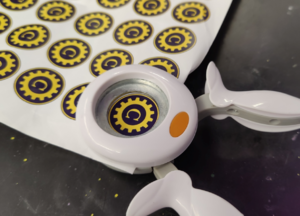
A button being cut from a sheet

Step 2: Make the Button.
- Your final button should consist of four parts. Make sure they're the same size!
- The plastic pin backing.
- The metal shell
- Your paper design
- The plastic protection
- Place the metal shell in the left chamber of the button press.
- Place your design and the plastic protection on top of that.
- KCHUNK IT, BABY!
- Place your plastic back in the right chamber
- KCHUNK IT AGAIN!
- Enjoy your delightful new button.


