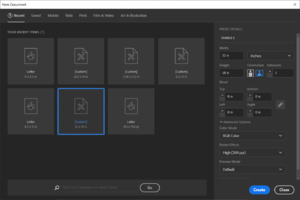
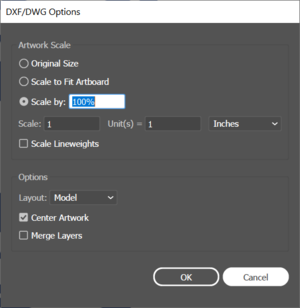
# '''Open Illustrator and create a new file.''' The size of the document should be 32" by 18", and the color mode should be set to RGB. See Fig. 1 for detailed settings. [[File:Image.png|alt=Illustrator file creation|thumb|Fig. 1]]or '''Open DXF file.''' Make sure the image was created in Imperial Units or set Scale: 1 Units = 1 [drawing units]. (Fig. 2) Once open, go to File ->Document Setup, and click "Edit Artboards". Make sure the width is set to 32" and the height is set to 18"
# '''Open Illustrator and create a new file.''' The size of the document should be 32" by 18", and the color mode should be set to RGB. See Fig. 1 for detailed settings. [[File:Image.png|alt=Illustrator file creation|thumb|Fig. 1]]or '''Open DXF file.''' Make sure the image was created in Imperial Units or set Scale: 1 Units = 1 [drawing units]. (Fig. 2) Once open, go to File ->Document Setup, and click "Edit Artboards". Make sure the width is set to 32" and the height is set to 18"
#'''Set Line Weight and Object Color.''' Depending on what kind of cutting or engraving is desired adjust the line or fill color according to the chart below: {| class="wikitable"
#'''Set Line Weight and Object Color.''' Depending on what kind of cutting or engraving is desired adjust the line or fill color according to the chart below:
{| class="wikitable"
|+
|+
!Mode
!Mode
Revision as of 17:34, 3 June 2021
Available in the Student Machine Shop, the laser engraver is a Universal Laser Systems PLS6.75. It is capable of engraving on glass, stone, plastics, wood, and coated metals, and cutting through wood and plastics up to 1/2" (12mm).
Software
When using the laser engraver, it presents itself to the computer as a generic printer. Most commonly, Adobe Illustrator is used to generate print files for the laser cutter.
Materials
Material
Engrave
Cut (Max thickness)
Acrylic
✓
1/2"
Plywood
✓
1/4"
Delrin
✓
1/4"
Polystyrene
✓
1/4"
Anodized Aluminum
✓
x
Powdercoated Steel
✓
x
PVC
NEVER
NEVER
Instructions
Open Illustrator and create a new file. The size of the document should be 32" by 18", and the color mode should be set to RGB. See Fig. 1 for detailed settings. Fig. 1or Open DXF file. Make sure the image was created in Imperial Units or set Scale: 1 Units = 1 [drawing units]. (Fig. 2) Once open, go to File ->Document Setup, and click "Edit Artboards". Make sure the width is set to 32" and the height is set to 18"
Set Line Weight and Object Color. Depending on what kind of cutting or engraving is desired adjust the line or fill color according to the chart below: